Create character set files for pterm
ptermcs [-S i|m|n] [-s server] [-x x_pos]
        [-y y_pos] filename
- -S i|m|n
- Specify initial window state (i - iconify, m - maximize, n - normal).
- -s server
- Specify Photon server node or device name.
- -x x_pos
- Initial x_pos position of window.
- -y y_pos
- Initial y_pos position of window.
- filename
- Name of file to load.
The ptermcs utility creates files to specify character settings that pterm
uses for its custom font list.
When you invoke ptermcs, the Terminal charset setup dialog appears.
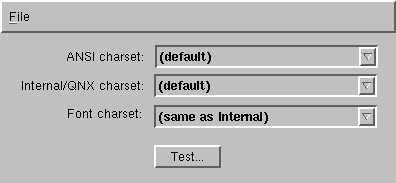
In this dialog, you can customize the charsets as follows:
- ANSI charset
- Choose a character set that you want pterm to use when
your terminal emulation is set to ANSI in pterm's Terminal Properties
dialog. The ISO 8859 character sets are a good choice for ANSI mode because all of the printable
characters are in this range (32-127, 160-255). Default is Western European (ISO 8859-1).
- Internal/QNX charset
- Choose a character set that you want pterm to use when
your terminal emulation is set to QNX in pterm's Terminal Properties
dialog. DOS code pages such as Cyrillic (IBM 866) or the PC character set ("IBM code page 437") are the best
choices since they contain all of the alphanumeric characters as well as the
line-drawing characters. Default is PC character set ("IBM code page 437").
- Font charset
- Choose the character encoding that your fonts use.
Default is PC character set ("IBM code page 437").
To save your changes, select Save on the File menu.
Run ptermcs using the Photon server on node 4:
ptermcs -s4
Or
ptermcs -s//4/dev/photon
Run at initial position (10,10):
ptermcs -x10 -y10
![[Previous]](../image-lib/prev.gif)
![[Contents]](../image-lib/contents.gif)
![[Index]](../image-lib/keyword_index.gif)
![[Next]](../image-lib/next.gif)