![[Previous]](image-lib/prev.gif) |
![[Contents]](image-lib/contents.gif) |
![[Index]](image-lib/keyword_index.gif) |
![[Next]](image-lib/next.gif) |
|
|
|
|
A tree of items that collapse and expand as requested
PtWidget --> PtBasic --> PtContainer --> PtCompound --> PtGenList --> PtGenTree --> PtTree
For more information, see the diagram of the widget hierarchy.

<photon/PtTree.h>
The PtTree widget displays a tree of items that collapse or expand according to the user's selections. PtTree assumes that each tree item contains two images and a string.
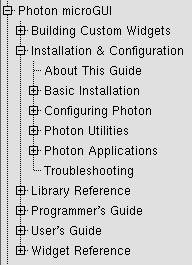
The Photon Helpviewer uses a PtTree widget to give you quick access to documentation.
To display items in columns, you can:
Or
With both methods, the Tab character is used in the item strings as a column separator.
 |
Even if you use columns, each line in the tree remains a single item. When you select any part of the line, the entire line is selected - having columns doesn't make the tree into a spreadsheet. |
The array of all available images is actually stored within the widget's Pt_ARG_TREE_IMAGES resource, and the items contain only indexes into this array. The item structure, PtTreeItem_t, also contains a "user data" pointer that isn't used by the widget. Note that there are some functions that free items. None of these functions attempts to free the user data.
The items should be allocated using the PtTreeAllocItem() function. This function uses the font and image list stored in the tree widget to determine the item's dimensions. This means that between creating an item and adding it to the widget, you mustn't change the widget's font or images. The tree widget passed to PtTreeAllocItem() must be the same widget that the item will be added to. The PtTree widget will free all its items automatically when it's destroyed.
Use PtTreeAddFirst() and PtTreeAddAfter() to build a tree. For example, suppose you wanted to build the following tree:
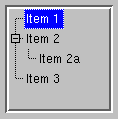
Assuming your tree widget is referenced by tree_wgt, use the following code:
PtTreeItem_t *item,*brother;
char *text;

/* Add "Item 1" as first root item */

text = "Item 1";
item = PtTreeAllocItem(tree_wgt,text,-1,-1);
PtTreeAddFirst(tree_wgt,item,NULL);
brother = item;

/* Add "Item 2" as root item after "Item 1" */

text = "Item 2";
item = PtTreeAllocItem(tree_wgt,text,-1,-1);
PtTreeAddAfter(tree_wgt,item,brother);
brother = item;

/* Add "Item 2a" as first child of "Item 2" */

text = "Item 2a";
item = PtTreeAllocItem(tree_wgt,text,-1,-1);
PtTreeAddFirst(tree_wgt,item,brother);

/* Add "Item 3" as root item after "Item 2" */

text = "Item 3";
item = PtTreeAllocItem(tree_wgt,text,-1,-1);
PtTreeAddAfter(tree_wgt,item,brother);
| Resource | C type | Pt type | Default |
|---|---|---|---|
| Pt_ARG_TREE_BALLOON | PtTreeBalloonF_t * | Pointer | See below |
| Pt_ARG_TREE_IMAGES | PhImage_t *, short | Array | NULL |
| Pt_ARG_TREE_IMGMASK | unsigned | Scalar | Pt_LIST_ITEM_SELECTED |
| Pt_CB_TREE_SELECTION | PtCallback_t * | Link | NULL |
| Pt_CB_TREE_STATE | PtCallback_t * | Link | NULL |
| C type | Pt type | Default |
|---|---|---|
| PtTreeBalloonF_t * | Pointer | See below |
A function that inflates a balloon for the item the pointer is on. PtTreeBalloonF_t is a function type:
typedef PtWidget_t *PtTreeBalloonF_t(
    PtWidget_t *widget, PtWidget_t *parent,
    PhArea_t *area, PtListColumn_t *column,
    PtTreeItem_t *item, int coln,
    const char *font);
The parameters are as follows:
The default function does this:
return
    PtGenListCreateTextBalloon(
      widget, parent,
      PtGenListSetColumnBalloon ( area, column ),
      item->string, coln, font);
| C type | Pt type | Default |
|---|---|---|
| PhImage_t *, short | Array | NULL |
A list of images that can be displayed with tree items. For more information about the image structure, see PhImage_t in the Photon Library Reference.
|
Set the flags member of the PhImage_t structures
to:
Ph_RELEASE_IMAGE | Ph_RELEASE_PALETTE |
Ph_RELEASE_TRANSPARENCY_MASK | Ph_RELEASE_GHOST_BITMAP
before providing the images to the widget. If you do this, the memory used for the images is released when the widget is destroyed or Pt_ARG_TREE_IMAGES is set. |
| C type | Pt type | Default |
|---|---|---|
| unsigned | Scalar | Pt_LIST_ITEM_SELECTED |
Defines the mask for selecting an item's image.
When you create an item by calling PtTreeAllocItem(), you specify the images to be used when the item is set or unset. An item is considered set if its flags masked with the tree's Pt_ARG_TREE_IMGMASK resource give a nonzero value. The flags include:
| C type | Pt type | Default |
|---|---|---|
| PtCallback_t * | Link | NULL |
A list of callbacks invoked when an item is selected from the tree.
Each callback is passed a PtCallbackInfo_t structure that contains at least the following members:
These callbacks should return Pt_CONTINUE.
If you multi-click on a tree, its Pt_CB_TREE_SELECTION callbacks are invoked once for each click. The callback data includes the click count (1 for the first click, 2 for the second, and so on).
If you want to process only the last of a series of clicks, use a Pt_CB_RAW callback to look for a Ph_EV_BUT_RELEASE event with a subtype of Ph_EV_RELEASE_ENDCLICK. For more information, see PhEvent_t in the Photon Library Reference.
|
The Ph_EV_BUT_RELEASE event with a subtype of Ph_EV_RELEASE_ENDCLICK occurs approximately half a second after the click, which could be annoying to the user. Most Photon applications don't use multiple clicks because of this. |
| C type | Pt type | Default |
|---|---|---|
| PtCallback_t * | Link | NULL |
Defines the state callbacks. Each callback is passed a PtCallbackInfo_t structure that contains at least the following members:
These callbacks should return Pt_CONTINUE.
If the widget modifies an inherited resource, the "Default override" column indicates the new value. This modification affects any subclasses of the widget.
In addition to the flags defined by PtGenTree, the following flags are defined:
By default, neither is set. The width and location of the balloon depend on these flags:
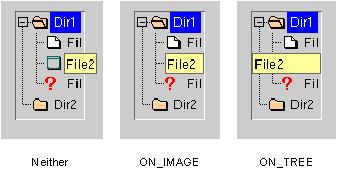
The Pt_ARG_TREE_FLAGS for a PtTree widget.
The PtTree widget defines the following convenience functions that make it easier to use the tree once it's been created:
|
|
|
|