![[Previous]](image-lib/prev.gif) |
![[Contents]](image-lib/contents.gif) |
![[Index]](image-lib/keyword_index.gif) |
![[Next]](image-lib/next.gif) |
|
|
|
|
An analog, digital, or LED clock
PtWidget --> PtBasic --> PtClock
For more information, see the diagram of the widget hierarchy.

<photon/PtClock.h>
A PtClock draws a clock and can optionally update its display periodically (about once a second) to reflect the current time.
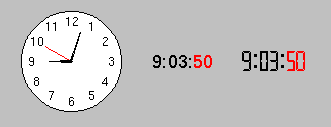
Analog, digital, and LED clocks created by PtClock.
This isn't necessarily an accurate way to track time.
 |
The widget may flicker excessively, particularly if a transparent fill color is
used. To reduce flicker:
|
| Resource | C type | Pt type | Default |
|---|---|---|---|
| Pt_ARG_CLOCK_FACE_COLOR | PgColor_t | Scalar | Pg_WHITE |
| Pt_ARG_CLOCK_FACE_OUTLINE_COLOR | PgColor_t | Scalar | Pg_BLACK |
| Pt_ARG_CLOCK_FLAGS | long | Flag | See below. |
| Pt_ARG_CLOCK_FONT | char * | String | "helv12" |
| Pt_ARG_CLOCK_HOUR | short | Scalar | Pt_CLOCK_CURRENT |
| Pt_ARG_CLOCK_HOUR_COLOR | PgColor_t | Scalar | Pg_BLACK |
| Pt_ARG_CLOCK_HOUR_OFFSET | short | Scalar | 0 |
| Pt_ARG_CLOCK_MINUTE | short | Scalar | Pt_CLOCK_CURRENT |
| Pt_ARG_CLOCK_MINUTE_COLOR | PgColor_t | Scalar | Pg_BLACK |
| Pt_ARG_CLOCK_MINUTE_OFFSET | short | Scalar | 0 |
| Pt_ARG_CLOCK_SECOND | short | Scalar | Pt_CLOCK_CURRENT |
| Pt_ARG_CLOCK_SECOND_COLOR | PgColor_t | Scalar | Pg_RED |
| Pt_ARG_CLOCK_SECOND_OFFSET | short | Scalar | 0 |
| Pt_ARG_CLOCK_SEP1 | char * | String | ":" |
| Pt_ARG_CLOCK_SEP1_COLOR | PgColor_t | Scalar | Pg_BLACK |
| Pt_ARG_CLOCK_SEP2 | char * | String | ":" |
| Pt_ARG_CLOCK_SEP2_COLOR | PgColor_t | Scalar | Pg_BLACK |
| Pt_ARG_CLOCK_TYPE | short | Scalar | Pt_CLOCK_ANALOG |
| Pt_CB_CLOCK_TIME_CHANGED | PtCallback_t * | Link | NULL |
| C type | Pt type | Default |
|---|---|---|
| PgColor_t | Scalar | Pg_WHITE |
The fill color of the clock's face (applicable only for analog clocks).
| C type | Pt type | Default |
|---|---|---|
| PgColor_t | Scalar | Pg_BLACK |
The color of the line drawn around the clock face (applicable only for analog clocks).
| C type | Pt type | Default |
|---|---|---|
| long | Flag | Pt_CLOCK_TRACK_TIME | Pt_CLOCK_SHOW_SECONDS | Pt_CLOCK_SHOW_NUMBERS |
Defines the clock's behavior. Possible values are:
| C type | Pt type | Default |
|---|---|---|
| char * | String | "helv12" |
The font to use. For analog clocks, this applies to the numbers on the face (if displayed). For digital clocks, this applies to the entire display.
| C type | Pt type | Default |
|---|---|---|
| short | Scalar | Pt_CLOCK_CURRENT |
The current hour setting for the clock (reflecting the current system clock setting if Pt_CLOCK_TRACK_TIME is set). This value is in 24-hour format. When setting this resource, a value of Pt_CLOCK_CURRENT causes the clock to assume the current system time setting.
| C type | Pt type | Default |
|---|---|---|
| PgColor_t | Scalar | Pg_BLACK |
The color to use when drawing the hours component.
| C type | Pt type | Default |
|---|---|---|
| short | Scalar | 0 |
Offset the clock setting by this amount when displaying the hours field.
| C type | Pt type | Default |
|---|---|---|
| short | Scalar | Pt_CLOCK_CURRENT |
The current minute setting for the clock (reflecting the current system clock setting if Pt_CLOCK_TRACK_TIME is set). When setting this resource, a value of Pt_CLOCK_CURRENT causes the clock to assume the current system time setting.
| C type | Pt type | Default |
|---|---|---|
| PgColor_t | Scalar | Pg_BLACK |
The color to use when drawing the minutes component.
| C type | Pt type | Default |
|---|---|---|
| short | Scalar | 0 |
Offset the clock setting by this amount when displaying the minutes field.
| C type | Pt type | Default |
|---|---|---|
| short | Scalar | Pt_CLOCK_CURRENT |
The current second setting for the clock (reflecting the current system clock setting if Pt_CLOCK_TRACK_TIME is set). When setting this resource, a value of Pt_CLOCK_CURRENT causes the clock to assume the current system time setting.
| C type | Pt type | Default |
|---|---|---|
| PgColor_t | Scalar | Pg_RED |
The color to use when drawing the seconds component.
| C type | Pt type | Default |
|---|---|---|
| short | Scalar | 0 |
Offset the clock setting by this amount when displaying the seconds field.
| C type | Pt type | Default |
|---|---|---|
| char * | String | ":" |
The separator to use between the hours and minutes field (applicable only for digital clocks; LED clocks always use a colon). Only the first character of the string is used.
| C type | Pt type | Default |
|---|---|---|
| PgColor_t | Scalar | Pg_BLACK |
The color to use when drawing the separator character between hours and minutes.
| C type | Pt type | Default |
|---|---|---|
| char * | String | ":" |
The separator to use between the minutes and seconds field (applicable only for digital clocks with Pt_CLOCK_SHOW_SECONDS set; LED clocks always use a colon). Only the first character of the string is used.
| C type | Pt type | Default |
|---|---|---|
| PgColor_t | Scalar | Pg_BLACK |
The color to use when drawing the separator character between minutes and seconds.
| C type | Pt type | Default |
|---|---|---|
| short | Scalar | Pt_CLOCK_ANALOG |
The clock type:
| C type | Pt type | Default |
|---|---|---|
| PtCallback_t * | Link | NULL |
A list of callbacks invoked when the time on the clock changes. This occurs once a second if Pt_CLOCK_SHOW_SECONDS is set, otherwise once every minute when the minute changes.
These callbacks are also invoked whenever a call to PtSetResources() causes a time change, provided the Pt_CALLBACKS_ACTIVE flag is set (see PtWidget).
Each callback is passed a PtCallbackInfo_t structure that contains at least the following members:
These callbacks should return Pt_CONTINUE.
If the widget modifies an inherited resource, the "Default override" column indicates the new value. This modification affects any subclasses of the widget.
|
|
|
|