![[Previous]](image-lib/prev.gif) |
![[Contents]](image-lib/contents.gif) |
![[Index]](image-lib/keyword_index.gif) |
![[Next]](image-lib/next.gif) |
|
|
|
|
A text field with a list of choices
PtWidget --> PtBasic --> PtContainer --> PtCompound --> PtComboBox
For more information, see the diagram of the widget hierarchy.

<photon/PtComboBox.h>
The PtComboBox class provides a widget that's built from two exported subordinate widgets: PtList and PtText.
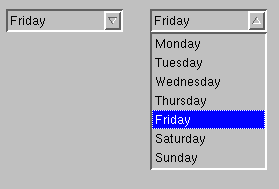
A PtComboBox widget provides a text-entry area and a list of choices.
You can type in the text field or choose a predefined entry from the list. The list can be either:
The widget behaves like a PtList or PtText widget, depending on which part has focus.
 |
You can't specify the selection mode for the list; Pt_ARG_SELECTION_MODE is blocked. The list always uses Pt_BROWSE_MODE. |
To select an item using the mouse, either click on an item or drag the the pointer down the list and release the mouse button when the correct item is highlighted. You can select only one item. If you drag the mouse, the list can be scrolled.
A blocking mechanism lets PtComboBox block the inheritance of certain resources from its subordinate widgets. This prevents any actions that would negatively affect the look and behavior of a PtComboBox widget. For more information, see the "Exported subordinate children" section.
The following callbacks are associated with the text part of the PtComboBox and are invoked as described for PtText:
The following callbacks are associated with the list part of the PtComboBox and are invoked as described for PtList:
PtComboBox also defines the following callbacks for the list:
| Resource | C type | Pt type | Default |
|---|---|---|---|
| Pt_ARG_CBOX_BUTTON_BORDER_WIDTH | unsigned short | Scalar | 2 |
| Pt_ARG_CBOX_BUTTON_BOT_BORDER_COLOR | unsigned long | Scalar | Pg_WHITE |
| Pt_ARG_CBOX_BUTTON_COLOR | unsigned long | Scalar | Pg_GREY |
| Pt_ARG_CBOX_BUTTON_TOP_BORDER_COLOR | unsigned long | Scalar | Pg_DGREY |
| Pt_ARG_CBOX_BUTTON_WIDTH | unsigned short | Scalar | 17 |
| Pt_ARG_CBOX_FLAGS | unsigned long | Flag | 0 |
| Pt_ARG_CBOX_MAX_VISIBLE_COUNT | unsigned short | Scalar | 0 |
| Pt_ARG_CBOX_SEL_ITEM | unsigned short | Scalar | 0 |
| Pt_CB_CBOX_ACTIVATE | PtCallback_t * | Link | NULL |
| Pt_CB_CBOX_CLOSE | PtCallback_t * | Link | NULL |
| C type | Pt type | Default |
|---|---|---|
| unsigned short | Scalar | 2 |
The width of the drop button border.
| C type | Pt type | Default |
|---|---|---|
| unsigned long | Scalar | Pg_WHITE |
The bottom border color of the drop button.
| C type | Pt type | Default |
|---|---|---|
| unsigned long | Scalar | Pg_GREY |
The fill color of the drop button.
| C type | Pt type | Default |
|---|---|---|
| unsigned long | Scalar | Pg_DGREY |
The top border color of the drop button.
| C type | Pt type | Default |
|---|---|---|
| unsigned short | Scalar | 17 |
The width of the drop button.
| C type | Pt type | Default |
|---|---|---|
| unsigned long | Flag | 0 |
Possible values:
| C type | Pt type | Default |
|---|---|---|
| unsigned short | Scalar | 0 |
The maximum number of list items that may be visible before scrollbars appear. If this is 0, the entire list is displayed without scrollbars.
You can use either this resource or Pt_ARG_VISIBLE_COUNT to control the size of the list, but you shouldn't use them both.
| C type | Pt type | Default |
|---|---|---|
| unsigned short | Scalar | 0 |
An index into Pt_ARG_ITEMS that indicates which list item is currently selected.
| C type | Pt type | Default |
|---|---|---|
| PtCallback_t * | Link | NULL |
A list of callbacks that the widget invokes when the list is activated (i.e opened).
Each callback is passed a PtCallbackInfo_t structure that contains at least the following members:
These callbacks should return Pt_CONTINUE.
| C type | Pt type | Default |
|---|---|---|
| PtCallback_t * | Link | NULL |
A list of callbacks that are invoked when the user closes the combobox's list.
Each callback is passed a PtCallbackInfo_t structure that contains at least the following members:
These callbacks should return Pt_CONTINUE.
Unless the resources are already defined in PtComboBox, the PtComboBox class uses the resources of its exported subordinate children, PtList and PtText.
The PtComboBox class "inherits" all the resources of its exported subordinate children, with the exception of the following, which are blocked:
Where PtComboBox and one of its exported subordinate children both define resources having the same name, the resource defined in PtComboBox takes precedence.
If PtComboBox modifies an inherited resource, the "Default override" column indicates the new value. If PtComboBox inherits a resource from one of its exported subordinate children, the default value assigned by the subordinate widget is inherited too; the "Default override" column shows this default value.
You can use either this resource or Pt_ARG_CBOX_MAX_VISIBLE_COUNT to control the size of the list, but you shouldn't use them both.
The PtComboBox widget and its exported subordinate PtList and PtText children define various convenience functions that make it easier to use the combo box once it's been created. Here's a brief overview:
|
|
|
|